We’re on a journey to create a better online experience for our Members. One that’s simpler, more helpful, and gives you greater visibility and control over your insurance and investments with MAS.
Navigation:
September 2026
myMAS is now your one-stop portal
On 30 of September, we closed the MAS Investor Portal and myMAS will be the only place you can manage your MAS products online.
For a while, Members with both MAS insurance and investment products have needed two separate logins to manage them. Switching between portals, remembering different login details and not knowing where to go wasn’t the effortless experience we wanted for our Members.
We’ve fixed this by bringing insurance and investments together in myMAS, creating a one-stop portal that makes it easier to manage your MAS products.
What's new in myMAS?
From 30 September 2026, you’re now able to switch investment funds directly in myMAS – something you could previously only do in the Investor Portal or by completing a PDF form.
It's easy to choose from our 7 investment funds to meet your goals. You can update the allocation of your current balance, future contributions or both. To learn how to switch funds in myMAS, check out our FAQ.
It's also easier than ever to keep your contact details up to date in myMAS, you can now change your email directly in myMAS without needing to call us.
What's staying the same?
Everything you could already do in myMAS is still there including:
- Viewing your investment balance with an interactive graph and a detailed view of your transactions.
- Accessing your annual investment statements and tax certificates.
- Viewing your insurance policy details, excess and claims history.
- Improved security with two-factor authentication.
What do I need to do?
If you’re already set up in myMAS, you're all sorted. There's nothing more to do, except check out the new features.
If you haven’t set up your myMAS account, follow these easy instructions – it only takes a few minutes.
What's coming next?
This is a big milestone, but not the end of the road. We'll keep improving myMAS with new features and capability over time, so keep an eye on this page.
April 2026
2024 and 2025 investment documents now easily accessible in myMAS
We want myMAS to become your one-stop portal for managing both your MAS insurance and investment products. This is why we’ve making sure everything you need is in one easy to manage place.
What’s new in myMAS?
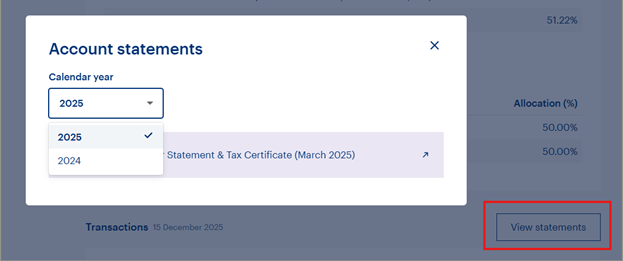
You can now view your investment documents (including annual statements and tax certificates) directly in myMAS. You can access these documents from the investments section of myMAS using the 'View statements' button next to the transactions section, you can even filter by year. Note, initially only 2024 and 2025 statements will be available. 2026 statements will be available soon.
What’s staying the same?
Both myMAS and the MAS Investor Portal will continue to run in parallel while we continue to add more functionality to myMAS.
What do I need to do?
Set up your account or log in to myMAS and head to the investments section to find the 'View statements' button to check out this new feature.
If you haven't already, make sure you've completed the secure Member login registration process – you'll need to use your email address to log in to myMAS.
What’s coming next?
Later this year, we'll be closing the Investor Portal and myMAS will be our one-stop portal for all your MAS investments and insurance needs. So, make sure to set up your account now to get familiar.
December 2025
A fresh, interactive view of your MAS investments
Thanks to your feedback, we’re making it easier for you to stay on top of your MAS investments with more timely investment insights.
What’s new in myMAS?
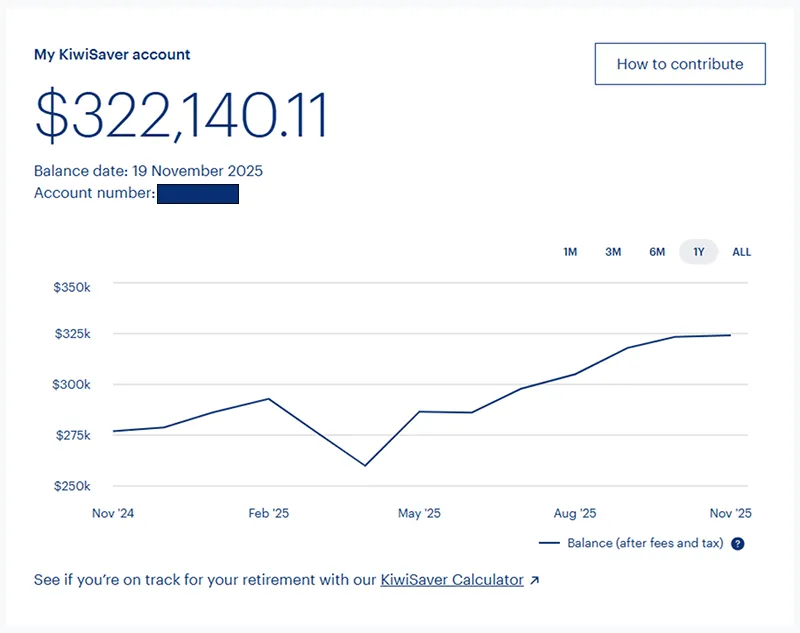
- View your balance over time with an interactive graph.
- Access a detailed view of your transactions, including a breakdown of transaction types such as contributions and withdrawals.
- Make contributions to your investment account by using new ‘copy’ buttons for the information you need for your online banking transfer.
What’s staying the same?
For now, you’ll still need to use the MAS Investor Portal to view documents and switch funds. Both portals will run in parallel while we continue to add functionality in myMAS.
What do I need to do?
Set up your account or log in to myMAS to take a look.
Make sure you’ve completed the new secure Member login registration process so you’re ready to explore your investments in myMAS. You now need to use your email address to log in to myMAS, instead of your MAS Member number. Logging in with your email address and multi-factor authentication adds an extra layer of protection against unauthorised access.
What’s coming next?
We’re excited to bring you further ways of engaging with with your investments – and we’re just getting started. Upcoming enhancements will include the ability to access your investment documents in myMAS.
October 2025
Improved security for your data
We’re enhancing the security of the myMAS Member Portal to better protect your personal and financial information. This involves moving our Members to a single secure email login replacing your MAS Member number.
What’s new in myMAS?
- Email login: You will need to log in using your email address instead of your Member number.
- Enhanced security: Each time you log in, you'll be emailed a code to securely verify it’s you accessing your account.
- Faster login experience: No need to look up your MAS Member number.
- Future-ready platform: These updates prepare myMAS for new tools to support your financial wellbeing
What’s changing?
- We’re moving away from having shared account access to a single account login to myMAS.
- Each person who accesses myMAS will need to set up their own unique email address. Shared email addresses can’t be used, as each login must be linked to an individual for security reasons. This means myMAS users who have ‘joint’ and ‘organisation’ logins, will now need to create their own individual myMAS account to access information inside myMAS.
- Logging in with your email address and a verification passcode adds an extra layer of protection against unauthorised access.
How do I set up my account?
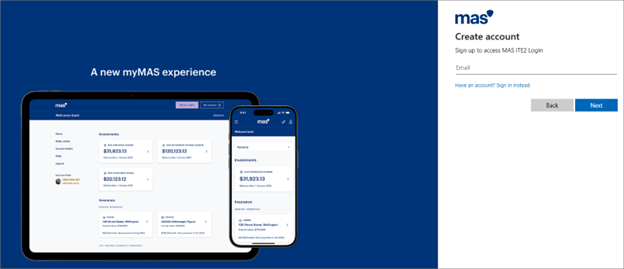
Follow these simple instructions to set up a myMAS account.
Medical Funds Management Limited is the issuer and manager of the MAS KiwiSaver Scheme, MAS Retirement Savings Scheme, and MAS Investment Funds. The Product Disclosure Statements are available at MAS KiwiSaver Scheme PDS, MAS Retirement Savings Scheme PDS, and MAS Investment Funds PDS.